FLUX.2 Klein vs FLUX 3 Image Klein on an RTX 5080: 4 Seconds per Image, 4 GB Less VRAM, Same Fake-Text Problem
Same 16 blog-header prompts and seeds on one RTX 5080: FLUX 3 Image Klein took a median 4.0 s per 1344x768 image vs 15.6 s for FLUX.2 Klein, using 6.3 GB vs 10.6 GB. Better layout adherence; both still drew fake text in 4 of 16.
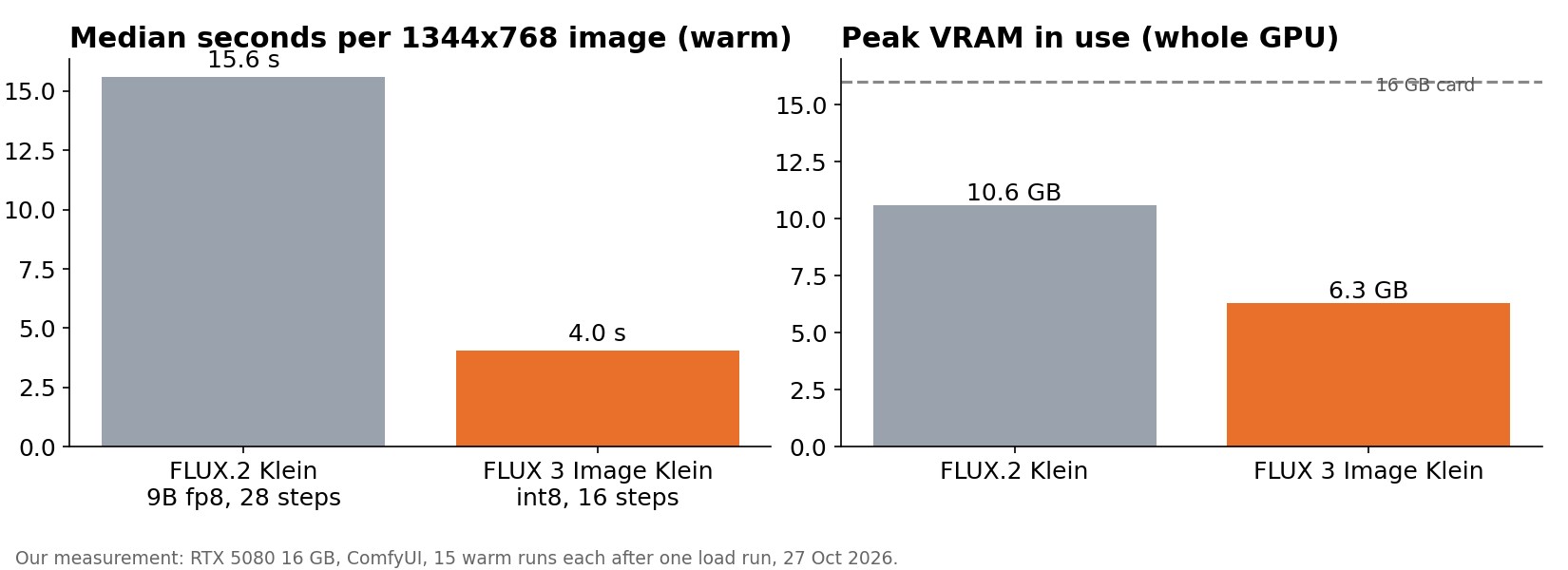
TL;DR — We regenerate blog header images locally, so we ran the same 16 header prompts with the same seeds through FLUX.2 Klein (9B fp8, 28 steps) and the new FLUX 3 Image Klein (distilled int8, 16 steps) on one RTX 5080 16 GB. FLUX 3 took a median 4.0 seconds per 1344×768 image, against 15.6 s for FLUX.2, while using about 6.3 GB of VRAM instead of 10.6 GB. It also followed layout instructions better (split screens, "paper cup", "no faces"). Neither model stopped putting fake text on paper, packaging and signs: each did it in 4 of 16 images, even with "no text" in the prompt.
Why we tested this
This blog replaced 121 stock header images with AI-generated ones this week. We generated 63 unique images with FLUX.2 Klein at about 16 seconds each, and four had to be redone because the model printed gibberish text into the scene.
FLUX 3 Image Klein landed in our local model folder the same day. The question was simple: is it worth switching for this job?
Setup
| FLUX.2 Klein | FLUX 3 Image Klein | |
|---|---|---|
| Weights | flux-2-klein-9b-fp8 |
flux3-image-klein-int8-convrot (distilled) |
| Text encoder | Qwen3 8B fp8 | Qwen3-VL 4B int8 |
| VAE | FLUX.2 VAE | FLUX.2 VAE |
| Steps / CFG | 28 / 1.0 (+ guidance 4.0) | 16 / 1.0 |
| Sampler | Euler, simple | Euler, simple |
| Resolution | 1344 × 768 | 1344 × 768 |
| Prompts / seeds | 16 header prompts, identical seeds | same |
- Hardware: RTX 5080 16 GB on Windows, running ComfyUI. No other GPU job was queued while we measured.
- Timing: wall time from queueing the job to getting the decoded image. The first image of each model includes loading the weights and is reported separately.
- VRAM: the highest whole-GPU memory use seen by polling
nvidia-smievery half second. That includes about 1 GB the desktop uses at idle. - Settings: FLUX.2 used the same settings that produced our 63 headers. FLUX 3 used the 16-step distilled setting we already use for character sheets.
- The prompts: short editorial scene descriptions plus "no text, no logos, no recognizable real person". We deliberately included scenes that invite text: letters, packaging, magazines and a Korean convenience store.
Speed and memory
| FLUX.2 Klein | FLUX 3 Image Klein | |
|---|---|---|
| First image (includes model load) | 23.3 s | 6.0 s |
| Median, next 15 images | 15.6 s | 4.0 s |
| Range, next 15 images | 15.4–35.6 s | 4.03–4.13 s |
| Peak VRAM (whole GPU) | 10.6 GB | 6.3 GB |
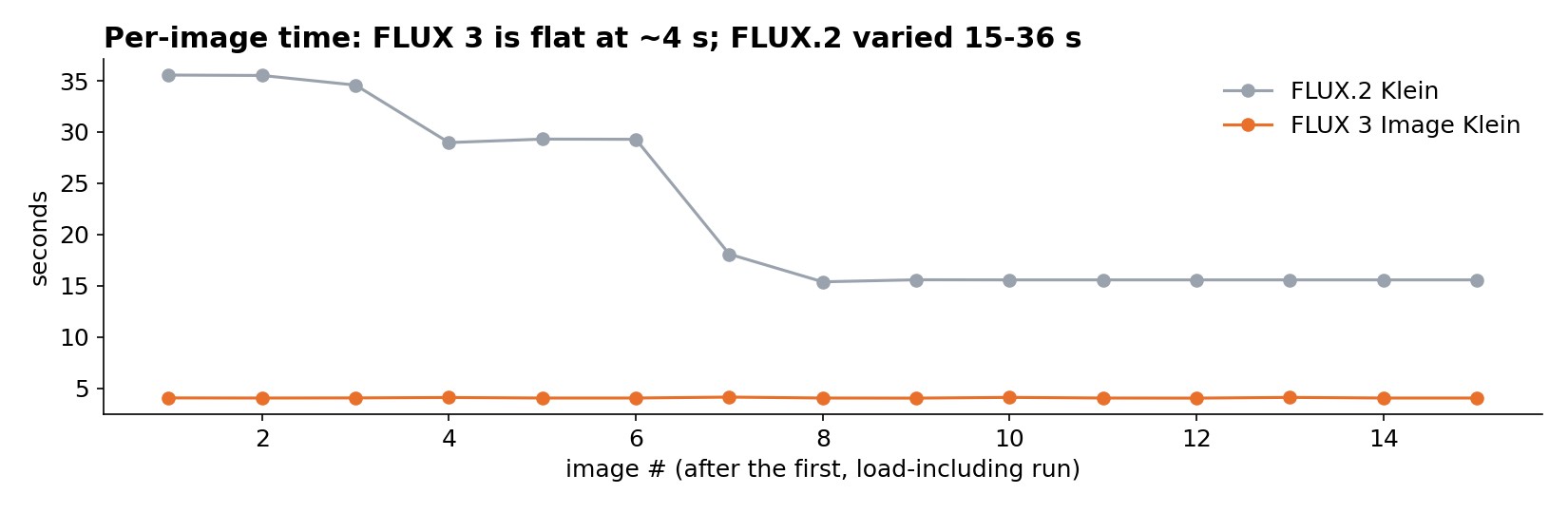
FLUX 3 was about 3.9× faster per image and remarkably steady: every warm run took between 4.03 and 4.13 seconds.
FLUX.2 was steady at 15.4–15.6 s for its last nine images. Its first six warm runs, though, took 29–36 s. We can't fully explain that from our logs. Memory pressure while the larger text encoder and the diffusion model shared the card is our best guess. Either way, the median is the fairer number, and it matches the ~16 s we saw when generating all 63 headers.
Half the steps (16 vs 28) explains part of the gap. The int8 weights and the smaller 4B text encoder explain the rest, and also the 4 GB of VRAM saved. That headroom matters on a 16 GB card if anything else runs alongside it.
Image quality, side by side
Left column FLUX.2 Klein, right column FLUX 3 Image Klein. Same prompt and seed per row.
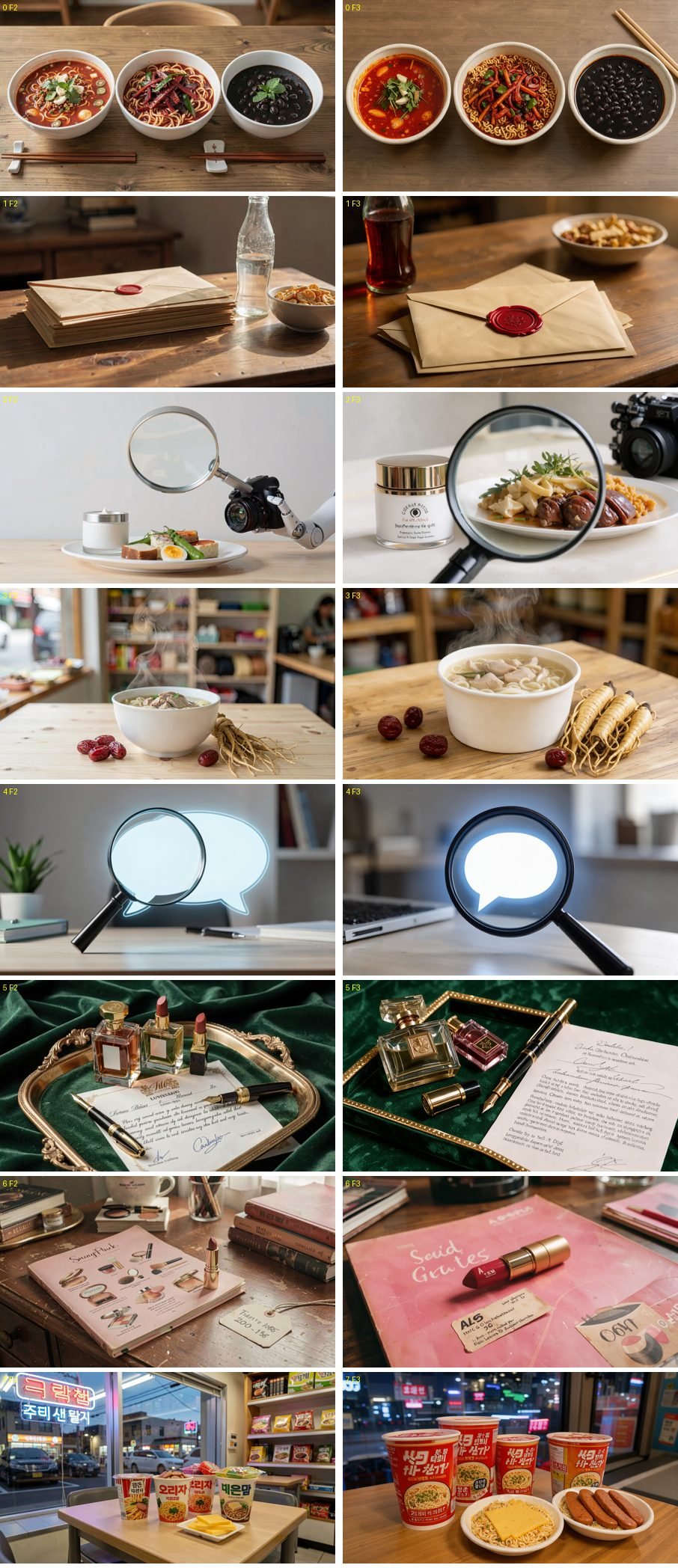
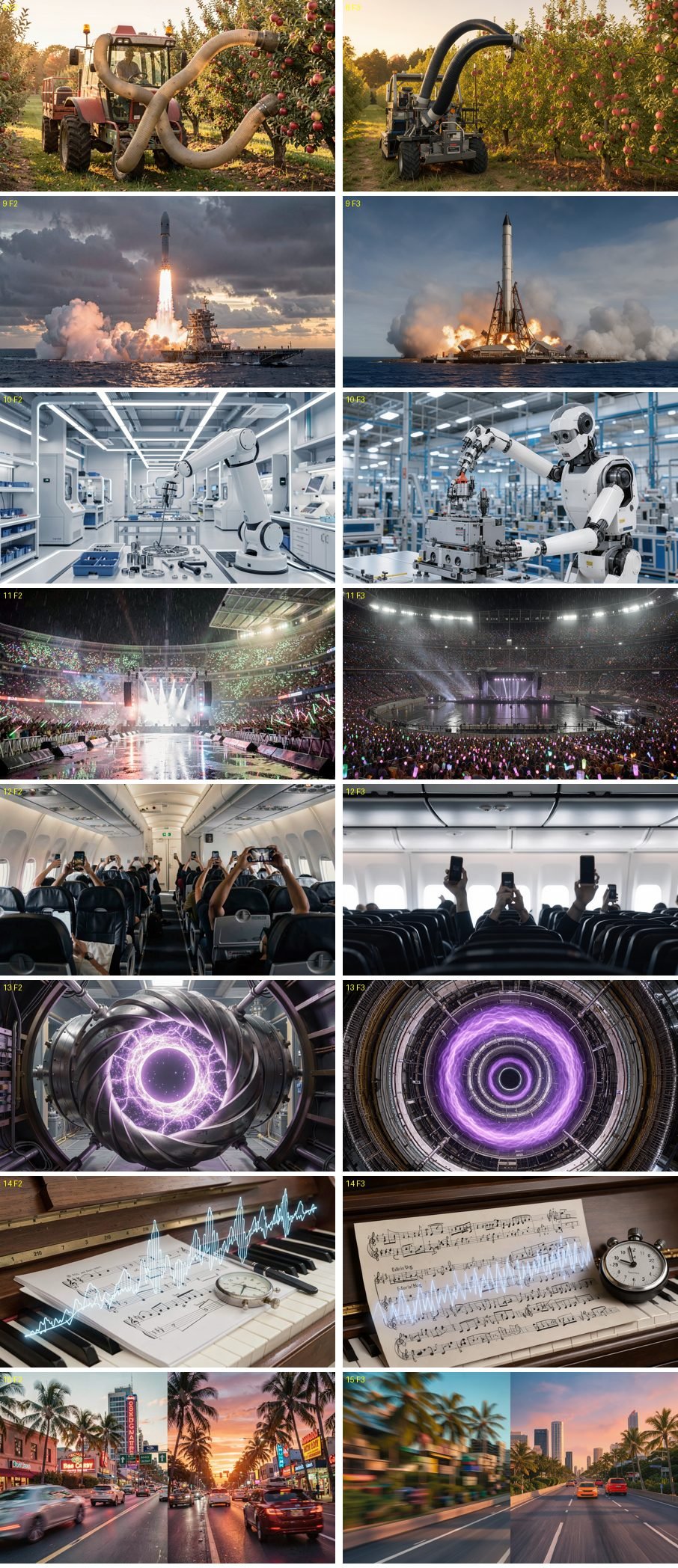
What we saw, prompt by prompt (our own reading of the images, not a metric):
| # | Prompt asked for | FLUX.2 Klein | FLUX 3 Image Klein |
|---|---|---|---|
| 0 | three bowls of noodles, top-down | good | good, slightly tighter crop |
| 2 | cosmetic jar and food under a magnifier | clean jar | fake label text on the jar |
| 3 | "plain white paper noodle cup" | used a ceramic bowl | used a paper cup, as asked |
| 5 | perfume, lipstick, pen, signed contract | fake contract text | fake contract text |
| 6 | vintage cosmetic catalog | fake magazine text | fake magazine text and tag |
| 7 | Korean convenience store, evening neon | fake Korean signs and labels | fake Korean labels on every cup |
| 10 | "humanoid robot arm assembling parts" | an industrial arm | a full humanoid robot |
| 11 | rain-soaked stadium concert, light sticks | good | good, wider |
| 12 | phones held up in a plane cabin, no faces | many people, faces partly visible | hands and phones only |
| 15 | split image: left side motion-blurred, right side crisp | both halves sharp; fake neon signs | left blurred, right crisp, no signs |
Gibberish text appeared in 4 of 16 images for each model (FLUX.2: 5, 6, 7, 15; FLUX 3: 2, 5, 6, 7). "No text" in the prompt reduces it but does not stop it. Scenes whose real-world version contains text, such as contracts, magazines and packaging, almost always get some. The practical fix is the prompt: ask for "sealed envelopes" instead of "notice letters", or a "plain white cup" instead of "cup noodle".
Prompt adherence was better with FLUX 3 on layout instructions: the split screen in #15, the paper cup in #3 and "no faces" in #12. It also took "robot arm" more liberally in #10 and drew a whole humanoid.
Look: both produce clean, photographic headers. FLUX 3 images are a little more saturated and closer-cropped. Neither is clearly prettier across the set.
Verdict
- For bulk blog headers on a 16 GB card, FLUX 3 Image Klein is the better tool: ~4× faster, ~4 GB less VRAM, and better at following layout instructions.
- It does not fix fake text. You still need to review each image and avoid prompts whose real-world scene contains writing.
- Licence: FLUX 3 is released under the FLUX Kommunity License. Check its commercial-use terms for your situation before using outputs commercially.
FAQ
How fast is FLUX 3 Image Klein on an RTX 5080? About 4.0 seconds per 1344×768 image at 16 steps in our test, after a 6-second first run that includes loading.
How much VRAM does it need? The whole GPU peaked at about 6.3 GB during generation, including roughly 1 GB used by the desktop.
Does it still put random text in images? Yes. Four of 16 images had fake text, the same count as FLUX.2 Klein, mostly on paper, packaging and signs.
Is this a quality benchmark? No. It is 16 prompts, one seed each, judged by eye for one use case: blog header images.
Measured by us on 27 Oct 2026 on an RTX 5080 16 GB with ComfyUI. All images in this article were generated in this test.
← Back to all posts