A Better Model Made My Prompt Worse: 20 Scenes, One Composition
A prompt template tuned for one image model produced 20 identical compositions on its successor. The template was not broken - it was being followed. Why stronger instruction-following turns stylistic padding into constraints, with the contact sheets.
TL;DR — A prompt template tuned over weeks for one image model was carried over to its successor. The new model generated 20 scenes in three minutes instead of forty, at visibly better quality — and all 20 came out with the same composition. The template was not broken. It was being followed. A model that obeys instructions more literally turns every hard-coded stylistic crutch into a constraint, and the fix was to delete two thirds of the prompt.
The setup
The task: 20 varied scenes sharing one visual identity. The old model needed heavy guidance to hold a look, so the prompt had accumulated a shared block bolted onto every scene sentence — style, lens, colour, and, critically, sky and lighting:
huge cumulus towering at the sides, bright moon, shooting stars, no black areas
Every one of those clauses was added to solve a real problem. The old model drifted to empty skies, so the sky was described. It rendered the ground black, so no black areas was added. Each was a nudge that moved a probability, and the block worked.
The new model in the same family generated each image in 6–16 seconds against the old model's 45–125. Twenty images in three minutes. Render quality was clearly better — cloud volume, water, fine detail.
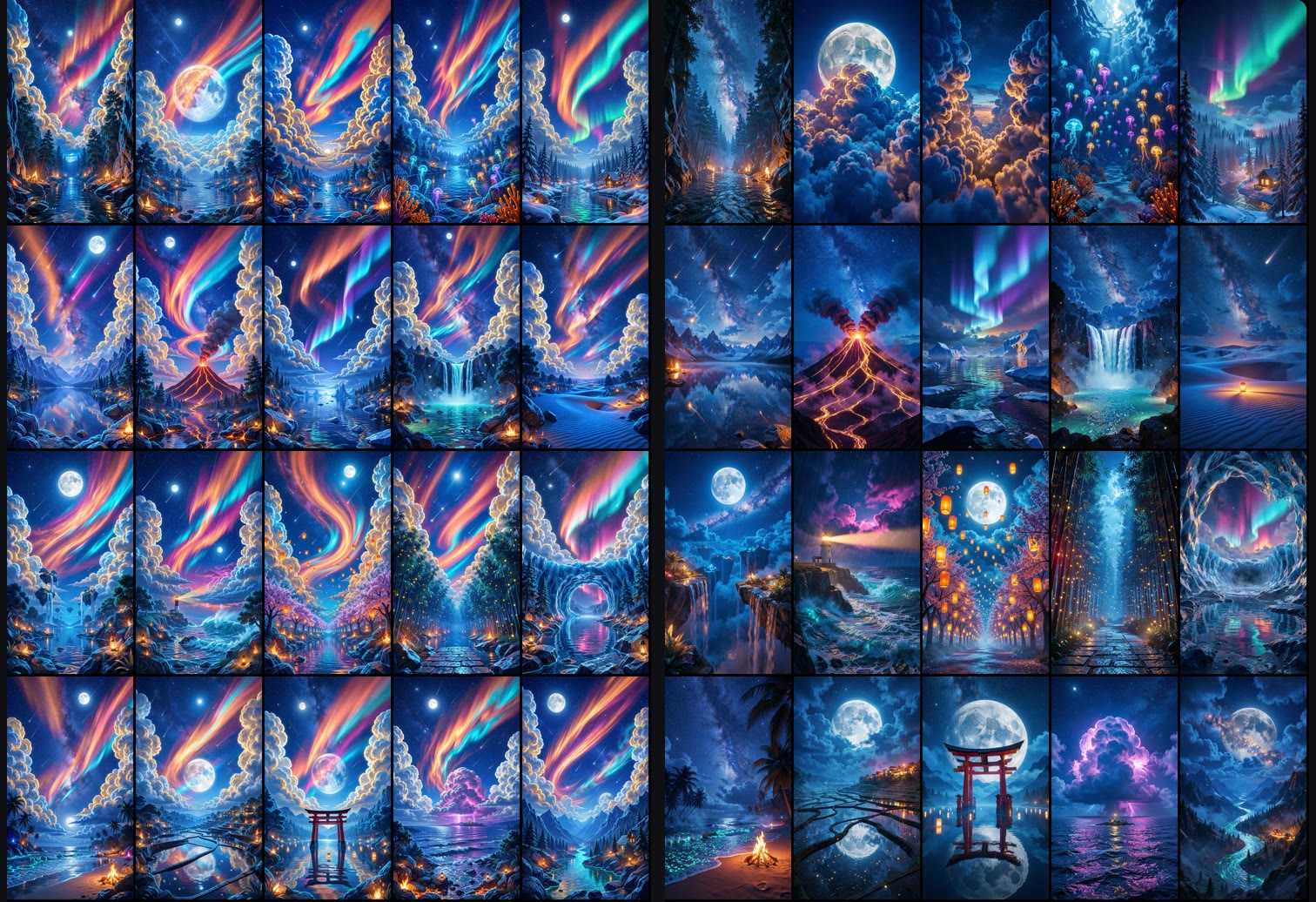
And the contact sheet showed twenty variations of one picture: cream cloud pillars on both sides, a rainbow nebula band across the middle, a moon at the top, meteors. Canyon, ocean, forest, desert — the same frame every time.
The diagnosis
Nothing had gone wrong. The prompt says put huge cumulus at the sides, a bright moon, and shooting stars, and leave no black areas. The new model did that. Twenty times.
The old model had treated the same text as suggestion. It absorbed the sky block as a tonal hint and then let the scene sentence — "a canyon", "a jellyfish sea", "a volcano at night" — determine the actual composition. The result read as varied because the model was only loosely complying.
The look block was never a style. It was a composition, and the old model's weak instruction-following was hiding that.
The measurements show the same thing from the other side:
| Saturation | Blue | Orange | Darkness | Brightness | |
|---|---|---|---|---|---|
| Reference target | 0.83 | 93% | 4% | 17% | 0.37 |
| Old model, final look (5 images) | 0.68 | 88% | 7% | 14% | 0.47 |
| New model, same prompt (20 images) | 0.61 | 76% | 15% | 1.9% | 0.60 |
Darkness — the share of the frame in deep shadow — collapsed from 14% to 1.9%, and brightness went from 0.47 to 0.60. That is no black areas being obeyed to the letter. Written for a model that crushed the ground to black, executed by a model that does not, it became an instruction to flood the frame with light. Orange doubled for the same reason: the moon-and-meteors clause was being drawn in every scene whether or not the scene had a night sky.
The fix: delete most of it
The shared block was cut to three things that are genuinely global — a style statement, a lens statement, and a colour statement — and every clause describing what is in the frame was removed. The sky was handed back to the scene sentence.
| Saturation | S > 0.5 | Blue | Orange | Darkness | White | Brightness | |
|---|---|---|---|---|---|---|---|
| Reference target | 0.83 | 89% | 93% | 4% | 17% | 3.4% | 0.37 |
| New model, over-instructed | 0.61 | 65% | 76% | 15% | 1.9% | 3.3% | 0.60 |
| New model, trimmed | 0.67 | 75% | 87% | 8% | 6% | 1.8% | 0.47 |
Every column moved toward the target, and the contact sheet showed twenty different compositions for the first time — a canyon with a galaxy over a forest, a jellyfish sea shot through with light shafts, a volcano with lava rivers. Same model, same scenes, same seeds. The only change was removing instructions.
Twenty scenes, twice. Left: the shared block kept — cream cloud pillars at both sides, a rainbow band, a moon at the top, in all twenty. Right: the same twenty scene sentences with the shared block trimmed to style, lens and palette. Same model, same seeds.
Two more instances of the same bug
Once you know the shape of it you find it everywhere in a prompt written for a weaker model.
A framing note became a drawn object. The lens block contained framed for a phone screen, meaning "compose for 9:16". The new model rendered white horizontal bars along the bottom of several images — a literal imitation of a phone's interface furniture. It had drawn the frame. Adding no interface elements, no bars removed them, and the phrase came out of every subsequent prompt.
A lighting instruction re-locked the composition. After the sky block was removed, a later experiment added place the light source behind the largest cloud to get backlit, translucent clouds. It worked — and all four test images came back with an enormous cumulus dead centre above the subject. Specifying the light relative to an object is implicitly specifying where that object goes. The fix was to state the light position per scene — upper left, at the horizon, outside the frame — rather than relative to a cloud.
The pattern in all three: a clause meant to influence one property also specifies another, and only a model that follows instructions closely will act on the second one.
Why better models make old prompts worse
This is counterintuitive enough to state plainly. Prompt engineering for a weakly-obedient model is largely the art of over-asking — you write more than you mean, because the model applies a fraction of it. The prompt that emerges encodes not just your intent but a correction factor for that specific model's tendency to ignore you.
Move it to a model that complies and the correction factor is applied at full strength. Your compensation for a defect becomes a defect, and there is no error, no warning, nothing to debug. The output is well-made, on-brief, and identical twenty times over.
Three practical consequences.
When you change models, delete before you add. The instinct on seeing a bad batch is to add clarifying instructions. On a more obedient model the correct first move is subtraction — strip the shared block to the minimum and see what the model does unaided. It probably needs less than its predecessor did.
Sort your prompt into "everywhere" and "this scene". Style, lens, palette are properties of the set. Sky, subject, camera position, light placement, composition are properties of one image. Anything in the second category sitting in a shared block will be reproduced in every image, and on a compliant model that means literally.
Suspect any clause phrased as a negation of a defect. no black areas, not blurry, avoid empty skies — these are almost always compensation for a specific model's specific failure. They have no meaning once that failure is gone, and they can invert into their own problem: no black areas produced a 1.9% darkness figure against a 17% target.
What this does not show
One model family, one look, one 20-scene batch. The mechanism — literal compliance turning stylistic padding into constraints — should apply to any move toward stronger instruction-following, but its size will vary by model.
Single seed per scene. The composition collapse was uniform across all 20 images, which no seed variance explains, but the colour figures are one draw each and their bands overlap in places.
The trimmed version is closer to the target on every axis and still short of it: darkness 6% against 17%, saturation 0.67 against 0.83. Those gaps were closed later by a different change — enabling classifier-free guidance — and that is a separate finding with its own trap in it.
FAQ
Why do all my generated images have the same composition?
Look for clauses in your shared prompt block that describe frame contents — sky, subject placement, light position, foreground objects — rather than style. On a model that follows instructions closely, those are composition instructions and they will be executed in every image. Measured here, removing them turned 20 identical frames into 20 different ones with no other change.
Should I reuse a prompt template when I upgrade the image model?
Not unchanged. A template tuned on a weaker model encodes compensation for that model's tendency to under-comply. Strip it to style, lens and palette, generate a test batch, and add back only what the new model demonstrably needs.
Why did my image get white bars along the bottom?
Something in the prompt described the display rather than the picture. framed for a phone screen was read as an instruction to draw phone interface furniture. Say the aspect ratio in the generation parameters and, if needed, add no interface elements, no bars.
Why does specifying my lighting keep centring the composition?
Because light placement described relative to an object also places the object. Put the light behind the largest cloud produced a giant cloud dead centre in every test image. Give the light an absolute position — upper left, at the horizon, outside the frame — per scene instead.
Is no black areas a useful instruction?
It was, for a model that crushed shadows. Carried to a model that does not, it produced 1.9% dark pixels against a 17% target and washed the whole set out. Negations of a defect are model-specific patches; audit them whenever you change models.
← Back to all posts